Facility — Vehicle Godmode
Vehicle GM
Anawack XS (full)
Requirement
- Own a Facility
- Own an Avenger
Core rules
- Accept target-mode switch — join Anawack XS and accept all alerts inside the pause menu
- Spawn into Facility twice — the glitch does not work on the first lobby spawn into the Facility
Steps
2
Join a new lobby — you need to spawn into the Facility a second time for the glitch to work
4
Press Left D-Pad to enter the hold
5
Immediately open Pause Menu
6
Join Anawack XS XS (full)
Accept all alerts including target-mode switch
7
Exit Pause Menu — you spawn inside the Facility outside the Avenger
8
Teleport outside the Facility
10
Call in the vehicle to GM
12
Drive the vehicle into the Avenger
If the glitch works correctly, you will end up inside the Avenger with no vehicle
13
Exit the Avenger through the side door
16
Enter Avenger through the back
17
Immediately exit through the back
Vehicle is now Godmode — verify with an Atomizer if unsure
Apartment Garage — Vehicle Godmode
Vehicle GM
Anawack XS (full)
Requirement
Own at least two apartments with garages in the same building
Core rules
- Accept target-mode switch — spam A through both alerts before garage animation starts
- Blue job respawn required to lock Godmode — do not skip even if car appears to already be in Godmode
Steps
1
Drive the vehicle you want to GM into an apartment garage in a building where you own at least two apartments with garages
e.g. Eclipse Towers, Weazel Plaza — any vehicle that can normally be stored in a garage can be made GM this way. For special vehicles use the Avenger method.
2
Hover over any garage (garage number does not matter)
3
Join Anawack XS XS (full)
Wait for Join a different GTA Online session alert to appear (Getting GTA Online session details appears first as a precursor)
If you don't wait, the vehicle will likely be bricked
4
Spam A through both alerts including target-mode switch
The car does not actually enter the garage — you reappear outside in the vehicle. To verify success, shoot the car with an atomizer and see if it moves.
5
Leave the vehicle and travel to a nearby but far enough away blue job marker so the vehicle respawns there, then join the job
Vehicle is now Godmode — verify with an Atomizer if unsure
Notes
Los Santos Customs freeze
Sometimes after applying Godmode, entering LSC freezes the car.
Most reliable fix:
- Open Pause Menu → Safety & Alerts
- Press A and Pause button simultaneously
- If successful: mini map appears on the Safety & Alerts screen, exit pause menu, movement returns
Alternative: join Anawack YT
Avenger — Vehicle Godmode
Vehicle GM
Requirements
- Own an Avenger
- Own a Richman Villa Mansion
Core rule
- Avenger must be positioned so the entry animation does not trigger — pressing Y spawns you directly inside
Steps
2
Call Martin and request a job
3
Fly to your Richman Villa Mansion (only location that works)
4
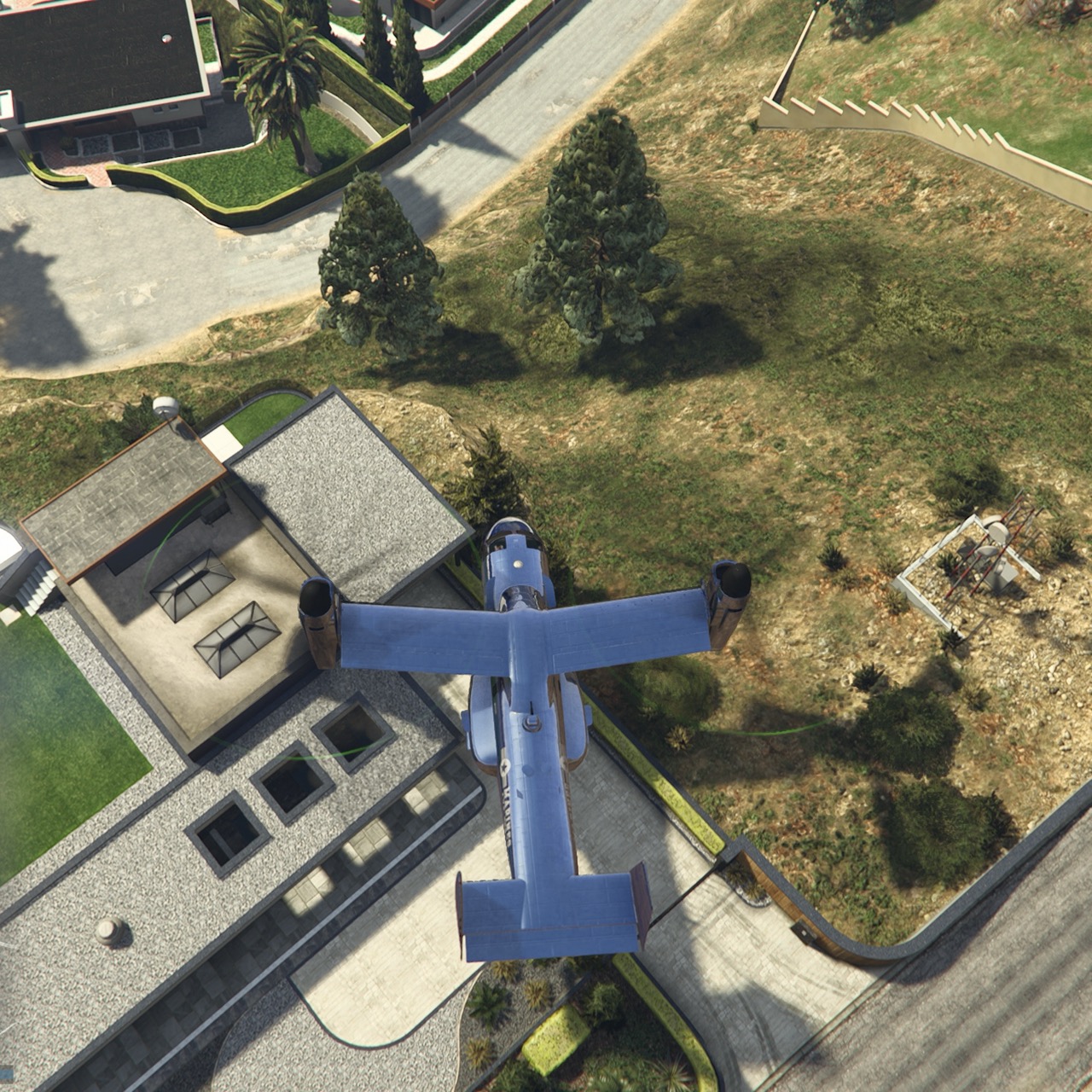
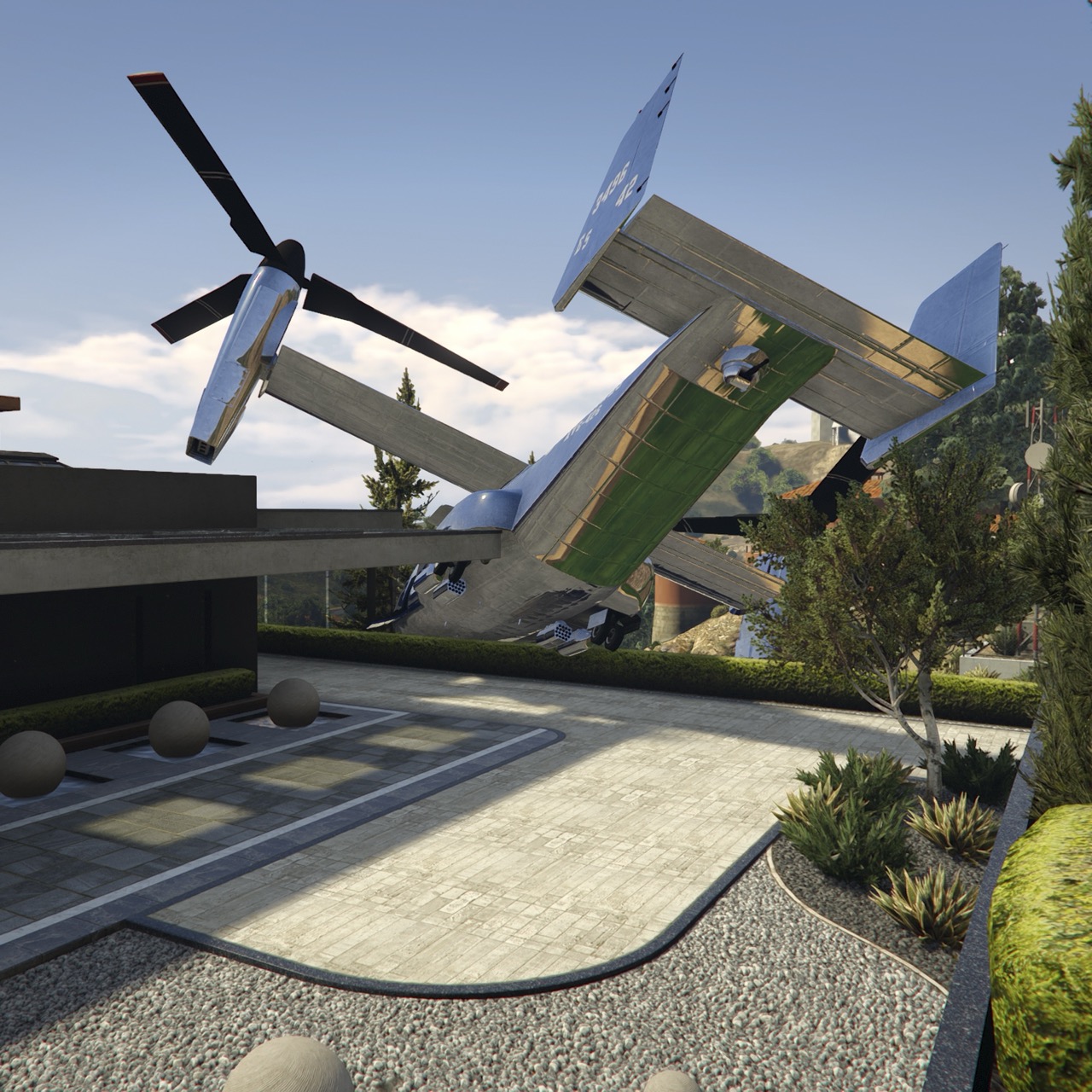
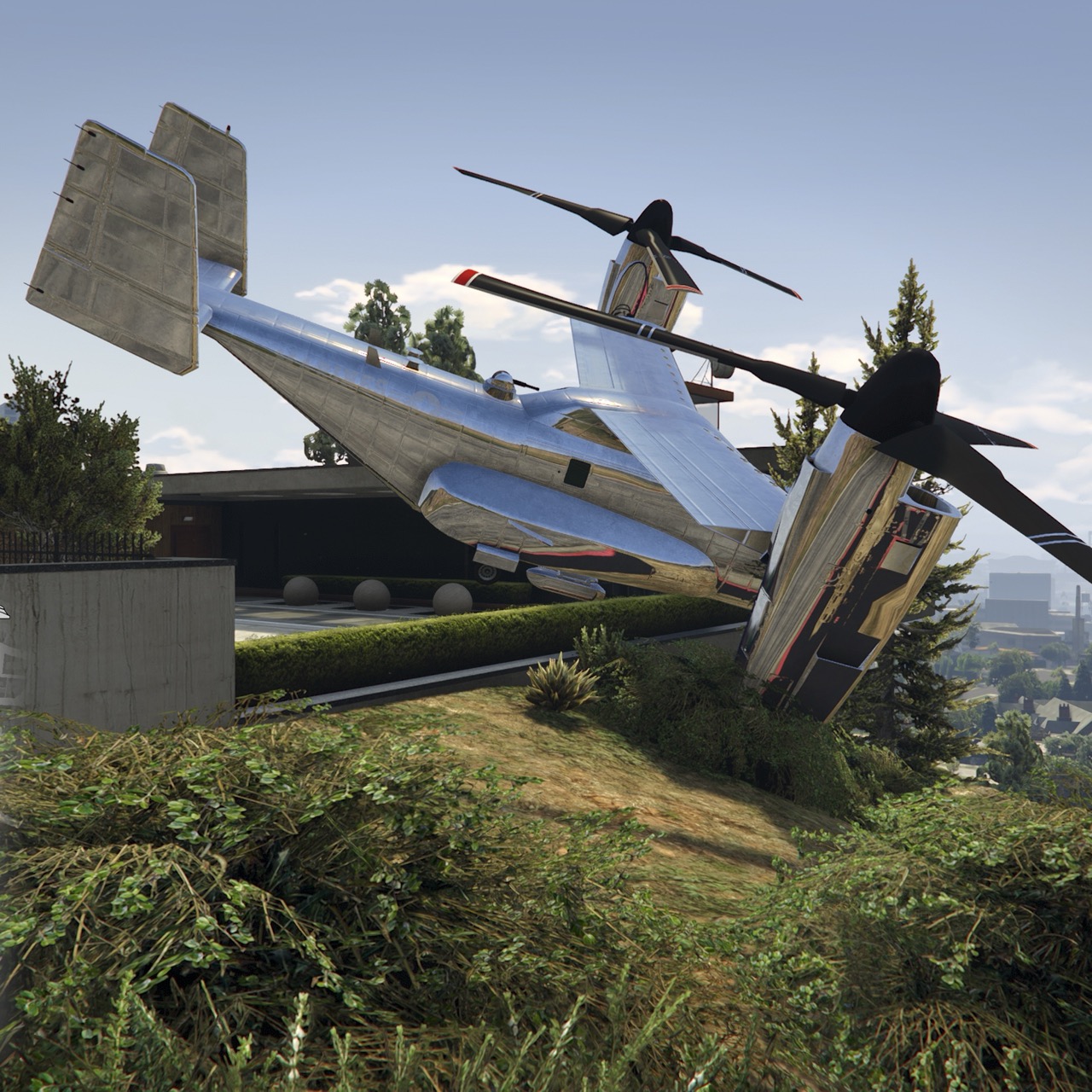
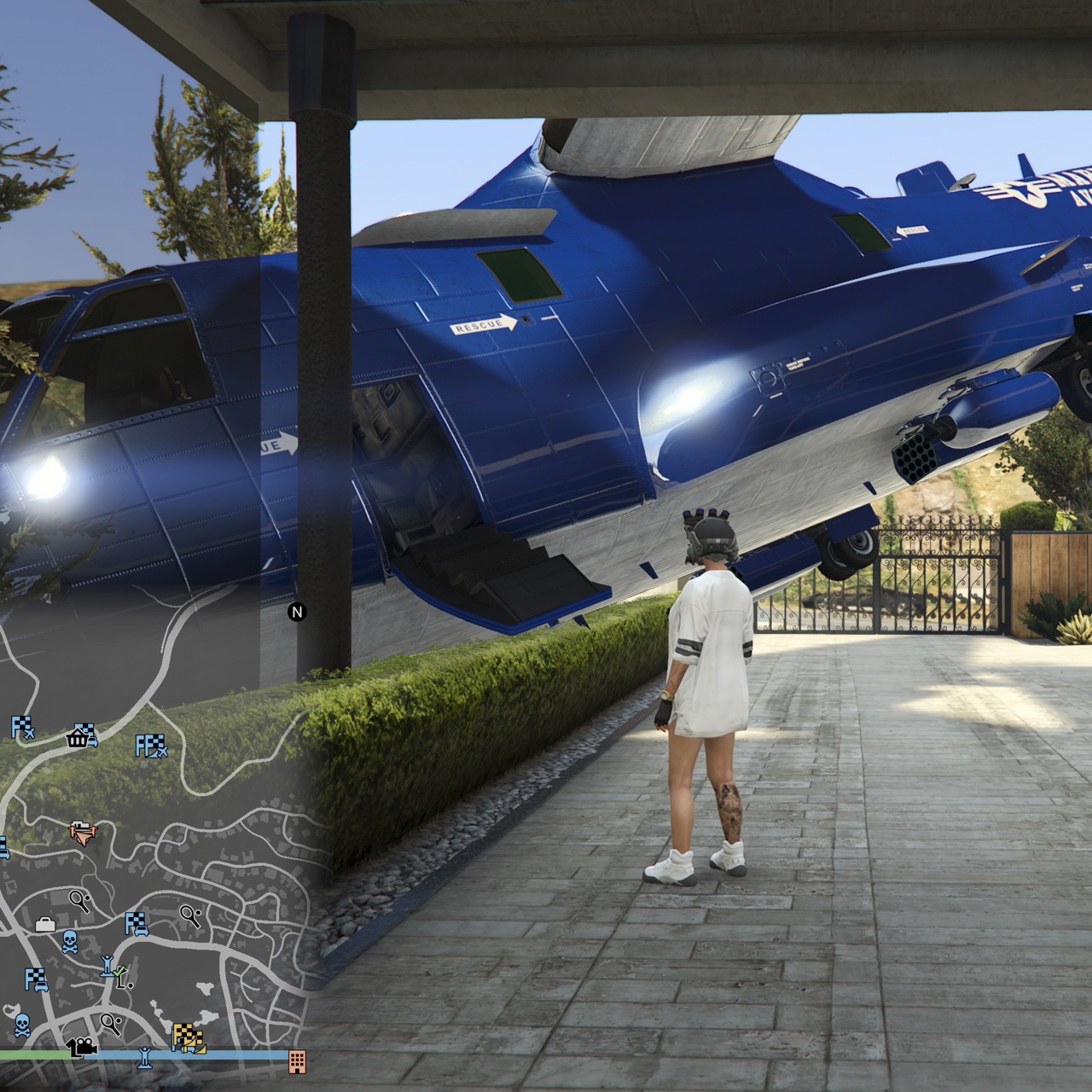
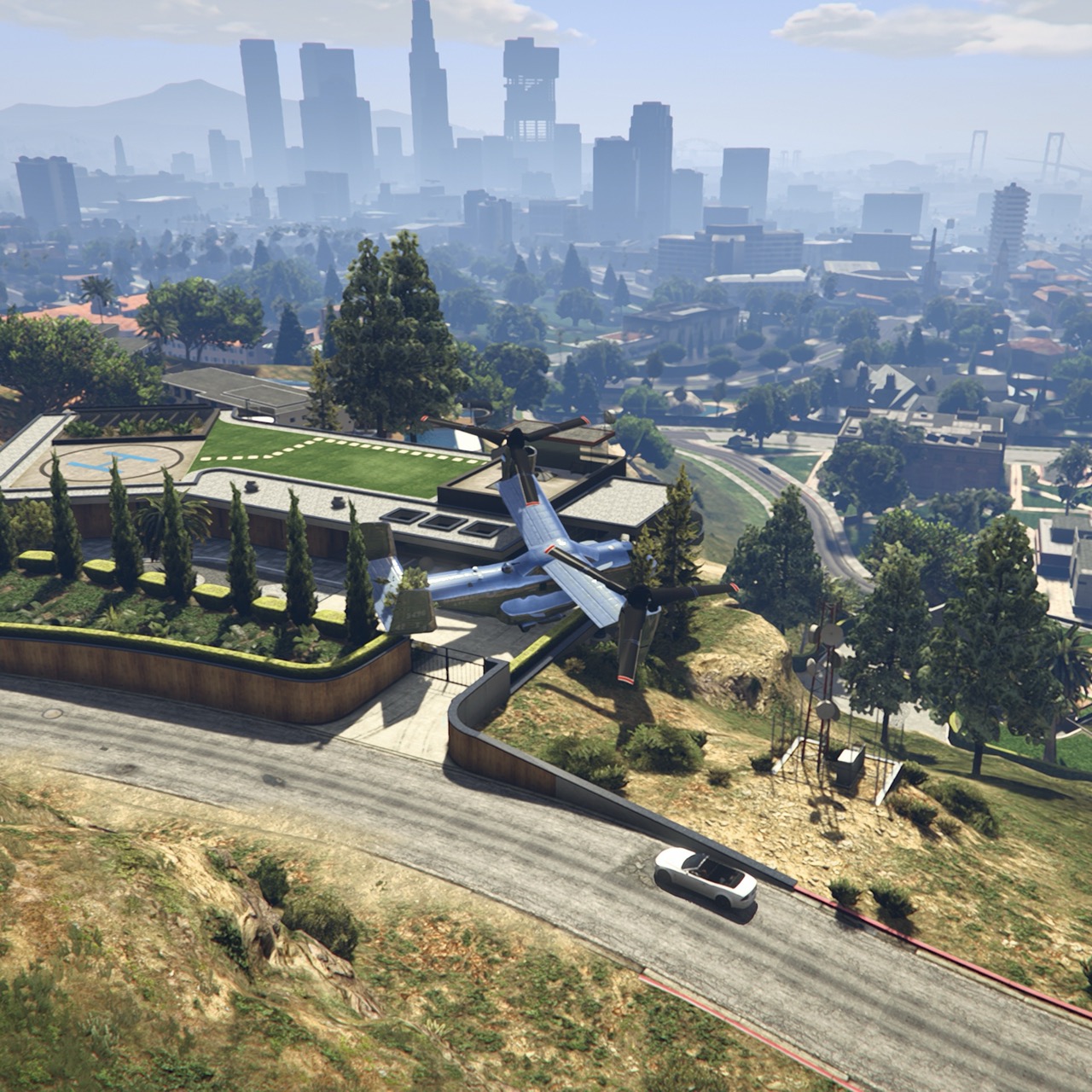
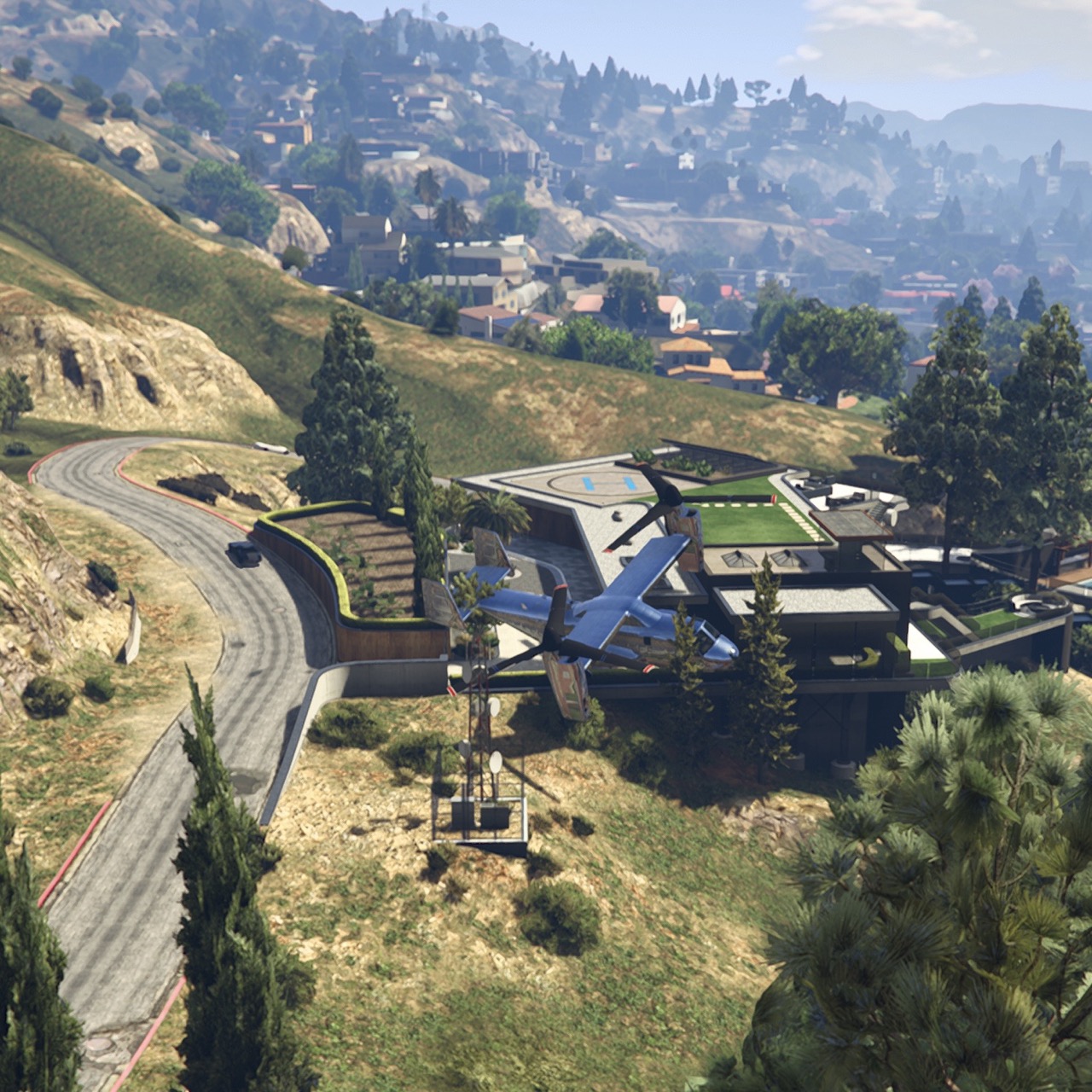
Land the Avenger nose-first into the hedge at the garage driveway entrance, steeply tilted with the rear end elevated — wings spanning across the driveway 📷 See photos
5
Stand beside the Avenger cockpit in the garage driveway — find the spot where both the Enter Avenger and Enter Mansion prompts are available simultaneously. Correct positioning is confirmed when pressing Y spawns you directly inside without an entry animation
6
Hold Right D-Pad to enter the Mansion
7
Do not move — accept the Martin job invite
8
Press RB to open the Online Leaderboard
9
Press B to exit the Leaderboard → press B again to quit the job — when the alert appears:
10
Immediately accept and spam Y simultaneously
If done correctly: brief black screen → you spawn outside the Mansion in your Avenger
Avenger is now Godmode — verify with an Atomizer if unsure
Notes
Entering the Avenger hold while in Character Godmode will remove your Character Godmode
Casino Penthouse — Character Godmode
Character GM
Requirements
- Own any Casino Penthouse
- The @unzents job must be bookmarked — it starts simultaneously with the limousine order, fails, and sends you skydiving under the map
Steps
1
Enter your Casino Penthouse
2
Open Interaction Menu → Appearance → set Action to Mask Audio
3
Hide all Job blips in Preferences
4
Walk up to the radio and press Right D-Pad (make sure radio is turned ON)
5
Press both joysticks at the same time
6
Open Interaction Menu → Show all Job blips in Preferences — keep the Interaction Menu open
7
Walk to the desk phone and exit the Interaction Menu
8
Pick up the phone to order Limousine Service
9
After putting down the phone, just before the arm touches the side of the body, hold Right D-Pad — count 1-2-3 quickly — release
If this timing doesn't work, try pressing Right D-Pad earlier — somewhere between the phone being put down and the arm reaching the side
10
While free falling push Left joystick up
Character Godmode active — verify by shooting the ground near your feet with an Atomizer
Notes
No jobs on map or in Penthouse. Go downstairs to the casino floor, then back up to the Penthouse.
Facility Payphone — Character Godmode
Character GM
Anawack XS (partial)
Requirements
- Own a Facility
- A saved Playlist with the relevant job must be ready to use
Direct teleport
Steps
2
Call Franklin → Payphone Hit
3
When phone appears, go inside Facility
4
Call Strike Team on any player and observe
5
As soon as observe cam appears, start your Playlist containing the custom Job that teleports to the facility payphone
Or use any blue job near payphone
6
Join Anawack XS XS (partial)
Accept first alert, decline second
Teleports directly to payphone
Normal Godmode → answer phone
Invisible Godmode → enter a vehicle → exit vehicle → place sticky on phone → blow it up while answering simultaneously
Mountain teleport
Steps 1–4 same as primary method, then:
5
As soon as observe cam appears, start any saved Playlist Job
6
Exit job → spawn on mountain
7
Transport yourself to blinking payphone
Normal Godmode → answer phone
Invisible Godmode → place sticky on phone → detonate while answering simultaneously
Character Godmode active — verify by shooting the ground near your feet with an Atomizer
Passive Mode with Weapons
Utility
Anawack YT
Core rules
- Passive mode must be ON
- Use same target mode only (Anawack YT)
- Using different target mode (Anawack XS) will break the glitch
Steps
2
Open Pause Menu and hover over any Job Playlist
Immediately and very aggressively spam A to join the job and Anawack simultaneously — you'll get stuck in clouds
4
Join Anawack YT again to get unstuck YT
5
You won't be able to enter vehicles or teleport — let police kill you to get unstuck
Passive mode with weapons active
Notes
Forcing someone out of this glitch
Start MC Club Work → Caged In. When the 5-minute countdown timer ends they will be kicked out of passive mode.
Freeze Time
Utility
Core use
- Lock time of day
- Helps avoid event lighting effects — weather freeze is not reliable with this method
Steps
1
Leave Online → Story Mode
3
Pause → Rockstar Editor → Director Mode
4
Select Actors → GTA Online character
5
Open Director Mode Settings → set Time of Day → Midday
Weather can also be set here but freezing it is inconsistent
6
On the Time of Day setting, press Y to Freeze time
Y is a function on the Time of Day setting specifically — it freezes the currently selected time
7
Open Pause Menu → load the same Story Mode save as in step 1
8
Confirm time remains frozen (phone time not changing)
9
Join Invite Only session and verify stable time
10
Can now change sessions (e.g. public) and time should remain frozen
Time frozen
Notes
Director Mode unavailable if:
- Wanted
- In a vehicle
- In a mission
Freeze Weather
Utility
Core use
- Freeze weather separately from time
- Can be combined with the time freeze method
Steps
1
Open Creator → Create Deathmatch
3
Fill required setup to begin testing
5
During test, join someone in Online
Weather frozen if timing hits correctly
Notes
Timing
Weather depends on GTA Online server time. Check current server time at gtalens.com. Join exactly when the server reaches your desired time — may require retries.
Car Merge — Ticket Booth Method
Utility
Anawack XS
Anawack YT
Requirements
- Own an Arena Workshop
- A friend at LS Car Meet
- Matchmaking set to Closed (Pause Menu → Online → Options)
Core rules
- A then X — must not be simultaneous, A first then immediately X
- Fidelity mode required for Part 1
- Friend stays put at LS Car Meet throughout
Part 1 — Ticket Booth Setup
Steps
1
Go to the Ticket Booth at the Arena Workshop property
3
Set Graphics Mode → Fidelity
4
Hover over a job on the map and wait until Start Job (X) appears in the bottom button prompts (takes a few seconds)
When target mode alert appears — prepare fingers on A and X
6
Press A then immediately X (milliseconds apart — not simultaneous)
✅ Success: you hear 3 booms and see "Are you sure you want to start this Job"
❌ Fail: network error joining job — retry from step 5
7
After 3 booms, count to 5 then press A (join job alert) → press A again (bad sport alert)
8
Go to ticket booth → buy ticket
Instruction text in top right is invisible — press Right D-Pad anyway
9
You will be frozen — join Anawack YT to unfreeze YT
Part 2 — LS Car Meet Setup
Steps
1
(Optional) Open Phone → Internet — Pause Menu now works normally — change graphics back to Performance RT
2
Accept LS Car Meet invite from friend (friend must send from inside LS Car Meet)
3
Both players request their personal vehicles
Your vehicle = donor (the car whose features you want transferred)
4
Enter friend's empty vehicle
5
Friend starts: Interaction Menu → LS Car Meet → Sprint Race — you must accept the sprint invite
6
Friend returns vehicle to storage via Interaction Menu → Manage Vehicles at 3–2 seconds remaining on countdown
You get kicked out into a black screen
Part 3 — Recovery
Steps
You spawn outside in your donor vehicle with a glitched camera
2
Reverse out into the road (camera is glitched throughout)
3
Spawn Buzzard or Sparrow
4
Fly up → jump out → do not move while falling (fall straight down to land on the same spot)
5
When you hit the ground you spawn back in your donor vehicle but can't move — join Anawack YT to get unstuck YT
Part 4 — CEO Office / Vehicle Warehouse
Steps
1
Reverse into the gate or fence of the parking lot across the road
2
Call CEO Luxury Helicopter
3
Enter helicopter → press Left D-Pad → Quick travel to CEO Office (regular vehicles) or Vehicle Warehouse (special vehicles)
Part 5 — Merge Selection
Regular vehicles
1
Inside office: push Left Joystick Up to walk to desk → press Right D-Pad
2
Select the vehicle you want to receive the merge
3
You spawn outside the office — continue to Part 6
Special vehicles
1
Walk down to the warehouse basement
2
Enter the special vehicle you want to receive the merge
3
Join Anawack XS XS (partial)
Accept first alert, decline second, press OK on third (cannot join bad sport lobby)
4
Spawn Buzzard or Sparrow → fly up → kill yourself
You spawn in your merged vehicle — skip to Final Steps
Part 6 — Finalization (regular vehicles only)
Steps
1
Join Anawack XS XS (partial)
Accept first alert, decline second, press OK on third (cannot join bad sport lobby)
2
Spawn Buzzard or Sparrow
You spawn in your merged vehicle
Final Steps
Steps
1
To restore normal camera: friend leaves the lobby — or you join Anawack YT YT
2
Go to LS Customs (or Avenger for special vehicles)
3
Change one thing to save the merge
Common failure points
- Pressing A + X simultaneously ❌
- Not waiting for Start Job (X) prompt before joining
- Friend mistiming the 3–2 second vehicle return
- Wrong Anawack join (XS vs YT)
Car merge saved